Sales & checkout
Cash register & closing
Updated on Friday 18 September 2026
Open with a float, record cash in and out, and close by counting the shift's cash.
The cash register controls your shop’s physical cash: how much there was at opening, how much came in and went out during the shift, and how much there should be at closing. Anything that isn’t cash — card, transfer, gift card — never touches it.
Enabling the register
In Your store → Point of sale turn Cash register on (“Require an open register to sell”). From then on the point of sale won’t charge without an open register, and the first-steps list adds the step of opening one.
You can run the shop without this option: registers are then optional and the point of sale always charges.
Opening the register
- Open Registers and press Open new register.
- Count the cash the shift starts with and enter it under Initial cash amount.
- Leave a note if you want (who takes the shift, where the float came from).
- Press Open cash register.
Only one register can be open at a time in the whole shop. Anyone on the team, counter staff included, can open, move and close a register.
During the shift
While the register is open, the expected cash goes up and down by itself:
- Cash sales completed during the shift: they add.
- Layaway deposits paid in cash: they add.
- Cash refunds from a return: they subtract.
- Card, transfer and gift card sales: they don’t count.
The Register open pill at the point of sale shows the expected total without leaving the charging screen.
Cash in and cash out
Every peso that comes in or goes out without being a sale is recorded as a cash movement, or it will show up as a shortage or a surplus at closing.
- In Registers — or in the register pill’s menu, from the point of sale — choose Cash movement.
- Pick Cash in or Cash out.
- Enter the Amount and the Reason (“supplier payment”, “change”, “owner withdrawal”).
- Press Record.
Closing the register
- In Registers press Close current register — or Close register in the pill’s menu, if you’re at the counter.
- The window shows the breakdown: opening money, cash sales, cash in and cash out, and the Expected total in register.
- Count the physical cash and enter it under Final cash amount.
- Write down anything that needs explaining in the closing notes and press Close register.
The difference is what you counted minus what was expected: negative is a shortage, positive a surplus. A closed register is never closed or reopened again; to keep selling, open a new one.
One register’s page
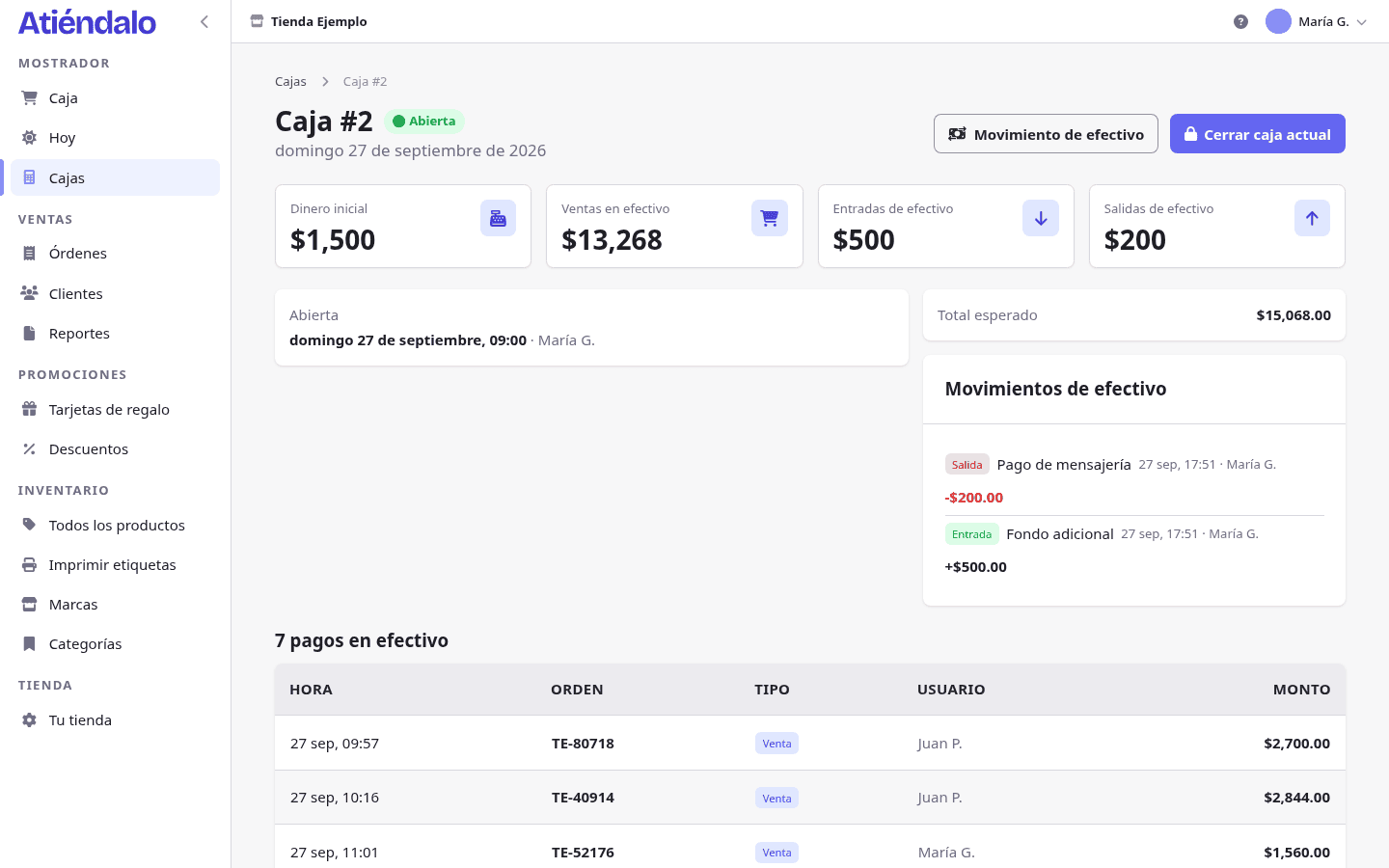
Every register has its own page with the full breakdown: the float, the expected total, the difference, who opened and who closed it, every cash payment that went through it — sale, layaway deposit or refund, each linked to its order — and its cash in and out.
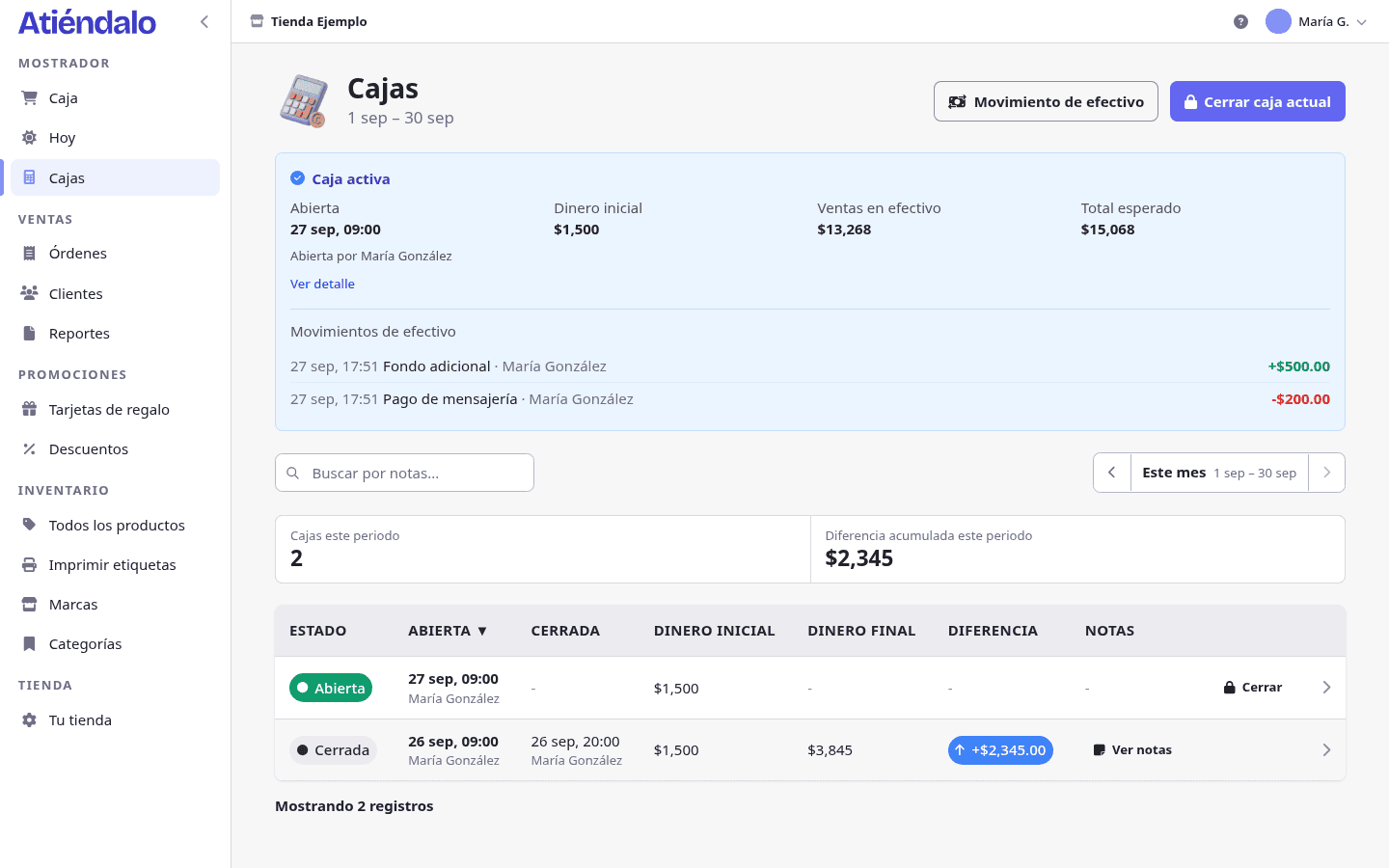
At the top of the list you get the period’s registers and their accumulated difference: that’s the number that tells you whether a bad count was one odd day or a habit.
What can go wrong
- “You must open a register before making sales”. The option is on and nobody opened a shift. Open one in Registers, or turn the option off in Your store → Point of sale.
- It won’t let you open another register. One is already open, even if it’s yesterday’s. Close it first; if the previous shift left without closing, close with whatever cash is there and say so in the notes.
- Money is short by the same amount every day. It’s almost always unrecorded cash out (the change, the water bill). Record it as a cash movement at the time.
- A card sale doesn’t show in the register. That’s correct: only cash moves the register. For the day’s total, look at Today or the reports.
- They paid with a gift card and the cash didn’t go up. Also correct: redeeming a card isn’t money coming in — the money came in the day the card was sold. See Gift cards.
- You closed with the wrong amount. A closing can’t be undone. Leave a note on the next register and adjust with a cash movement.