Sales & checkout
Returns
Updated on Friday 18 September 2026
Take items back from a completed sale, decide the refund, and leave the trail in the brand's settlement.
A return takes items back from a sale that’s already completed: the customer gets their money, stock goes back on the shelf, and the brand stops being paid for what came back. It all starts from the order.
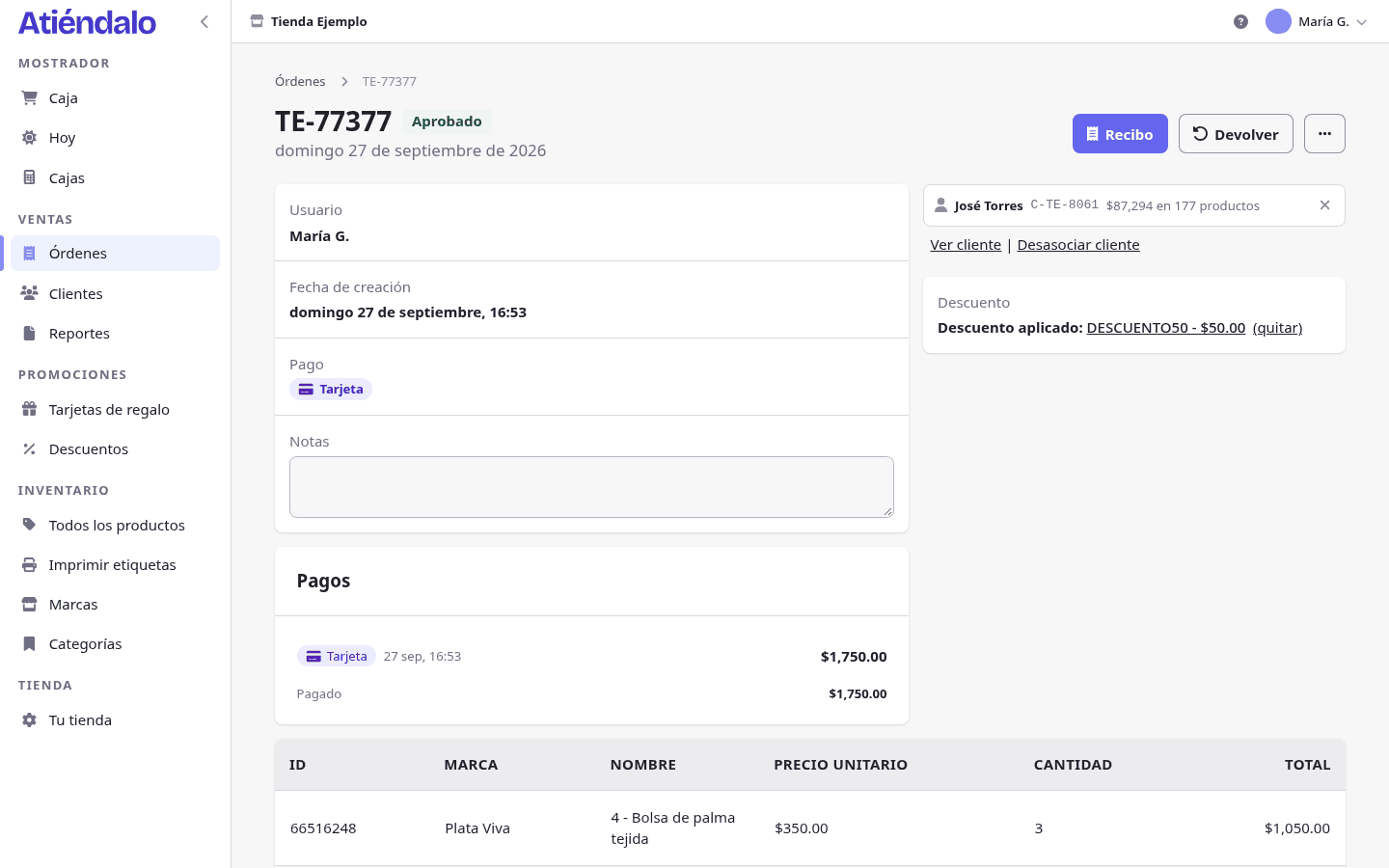
Who can return
Returns are admins only. Counter staff never see the Return button, even on their own sale.
The button only shows when the sale is Approved and still has units left to return. An adjustment order (the negative one a return creates) can’t be returned again.
Recording a return
- Open the sale in Orders. The search box takes the order ID.
- Press Return.
- In the Units to return column type how many come back on each line. You can also scan the label: the line ticks itself and adds one unit. If the code doesn’t belong to this sale, the screen says so — Code … is not in this sale.
- Pick the Reason: Defective, Wrong item, Changed their mind, Exchange for another product, or Other.
- Pick Refund via: Cash, Card, Transfer or Gift card. The method the sale was paid with comes preselected; a mixed payment proposes Cash.
- Leave Return to stock ticked unless the item came back damaged.
- Add Notes if you need them.
- Press Record return. You land back on the order with Return recorded. Refund: $…
The return stays on the order, in the Returns section (date, who did it, reason, refund and the brand impact unit by unit) and in the History as Return.
The refund and the cash drawer
- Cash. It comes out of whichever register is open at that moment: the expected cash drops by that amount and the movement shows on the register as Refund. If the count doesn’t add up at closing, see Cash register & closing.
- Card and Transfer. They’re recorded on the sale but never touch the cash drawer: you send the money back through your terminal or your bank.
- Gift card. The balance goes back onto the very card the sale was paid with. If the sale wasn’t paid with one, the method isn’t even in the list. See Gift cards.
The refund is stored as a negative payment on the sale, so the order’s Payments panel shows it flagged as a refund.
Back to stock, or written off
- Ticked (the usual): the units go back into the product’s stock and can be sold again.
- Unticked: the item doesn’t go back on the shelf. Atiéndalo records a negative receipt per brand with the reason Write-off and the note “Write-off from return of sale …”, and the return is labelled not restocked. See Stock receipts.
What happens to the brand
Every line of the sale reaches the return form with a label in the Settlement column:
- Pending — the brand hasn’t been paid for it yet. The line shrinks: the sale is recalculated with fewer units and the brand’s payout for this period simply comes out lower.
- Settled — the brand was already paid. The sold line is never touched (it’s history); Atiéndalo creates a negative adjustment order dated today, carrying those units’ share of the discount, the card commission and the consignment fee. That order is deducted from the brand’s next settlement. You’ll see its ID on the return, next to Adjustment order:
In the list of returned units, the brand impact is exactly what comes off the brand, which is almost never the same as the customer’s refund: the refund includes the discount, while the impact is already net of commission and consignment. See Reports & settlements.
Gift cards can’t be returned
A gift card line never appears in the list of units to return. If you sold one by mistake, cancel the whole sale: that cancels the card, as long as nobody has spent any of its balance.
The return in your reports
In Reports, the Returns section sums the period up: Refunded, Returns, Units returned, Return rate, Refunds by method and What comes back most. The period’s sales also show as Sales (net of returns).
In the orders table and in the XLSX and CSV you download, the Type column tells Sale from Return: the adjustment orders are the ones with negative amounts.
Return or cancel
They’re not the same thing:
- Return takes some (or all) units of a completed sale back, with its refund and its settlement trail. Admins only.
- Cancel voids the whole sale from the order’s action menu (the window is titled Void …). It asks for a mandatory reason that stays in the history, stock comes back and the sale drops out of reports and settlements. Counter staff can cancel their own sales.
A sale already settled with the brand can’t be cancelled or edited — the message says so: this sale has been paid out to the brand and cannot be changed. There, the way out is a return. See Point of sale.
What can go wrong
- You don’t see the Return button. Returns are for admins, and only on Approved sales with units left to return. A layaway that isn’t paid off, a voided sale or an adjustment order can’t be returned.
- “More units of … are being returned than were sold.” You typed more than the line had left, or those units came back before. The Sold column tells you how many remain.
- “Enter at least one unit to return.” Every quantity is still zero: scan the item or type the quantity before saving.
- “This sale was not paid with a gift card; pick another refund method.” You can only refund onto a card when the sale was paid with that card. Pick cash, card or transfer.
- You scan and it says the code is not in this sale. It’s an item from another sale or another product. Returns only work against the lines of the order you have open.
- The register doesn’t add up after a cash refund. The expected cash already dropped when you recorded the refund: if the money hasn’t left the drawer yet, the count will come out over.