Running the shop
How to do a physical inventory count in your shop
Full counts or cycle counts, per consignor, scanning or by hand. How to freeze expected stock, explain the differences and adjust with a record.
Updated Monday 28 September 2026 · 6 minute read
A physical inventory is counting what is really in your shop and comparing it with what your system thinks is there. There are always differences: items sold without being rung up, deliveries nobody recorded, a garment that left in someone else’s bag. Counting doesn’t make them go away; it tells you where they are, so the stock figure becomes trustworthy again and, in a shop that carries consignment goods, each consignor is paid on real numbers.
Why count
- So the system’s stock means something. If it says three and the shelf has one, you’ll promise items you don’t have and reorder what you do.
- To find leaks. A shortage that keeps showing up for the same consignor, the same rack or the same shift is information.
- To answer to each consignor. With consignment, the stock isn’t yours. When a supplier asks how many of their pieces are left, the answer has to come from a count, not a guess.
- To close out a consignor who is leaving. Before handing back what remains, you count it.
Full counts or cycle counts
Full count. The whole shop at once, usually with the doors closed. It gives a clean snapshot of one moment, but it takes hours of work, means you can’t sell while it runs, and so it happens only a few times a year.
Cycle counts. You count one part at a time (one consignor, one rack, one category) on a schedule that covers the whole shop over a few weeks. Each count is short, can happen while you stay open, and mistakes surface sooner because nothing goes months without a look.
| Full count | Cycle counts | |
|---|---|---|
| Length of each count | Hours | Minutes |
| Do you have to close? | Almost always | No |
| How often | A few times a year | Ongoing |
| When a mistake shows up | At the next full count | Within weeks |
In a multi-brand shop, the natural unit for a cycle count is the consignor. Each one has its own space, its own goods and its own settlement, so counting per consignor matches the way you report to them afterward. You can count one consignor while the register keeps ringing up everyone else.
Before you start: freeze what you expect
The most important rule of a count is to fix, at the start, how much you expected to find of each product. If the expected figure moves while you count (because a piece sold, or because someone recorded a delivery), the comparison stops meaning anything: you no longer know whether a difference comes from the count or from what happened during it.
With a frozen list, if a piece you already counted is sold mid-count, the shortage it creates is explained by that one sale. Include products the system shows at zero: if you find pieces of something that “isn’t there”, that is a surplus you need to record too.
Scanning or counting by hand
By hand, with a sheet and a pencil, works for a few items, but it fails where it costs most: mixing up two similar products, skipping a line, or adding wrong at the end.
Scanning, each physical item is read once and the system keeps the tally. The person counting writes nothing down and doesn’t have to tell two sizes of the same style apart by eye. It is faster, and the mistakes that remain are of a different kind: items that weren’t scanned, or were scanned twice.
A few practices that help, however you count:
- One person counts, another handles. Whoever scans doesn’t move stock; whoever moves it passes it in front of the scanner.
- Count in physical order, from one end of the space to the other, not by product.
- Keep counted and uncounted apart, even if it is only with a card.
- Don’t accept partial matches. If the system takes “shi” as a search, it may count a shirt where there was a shift dress.
- Save your progress on a long count, so closing the screen doesn’t lose it.
What to do with the differences
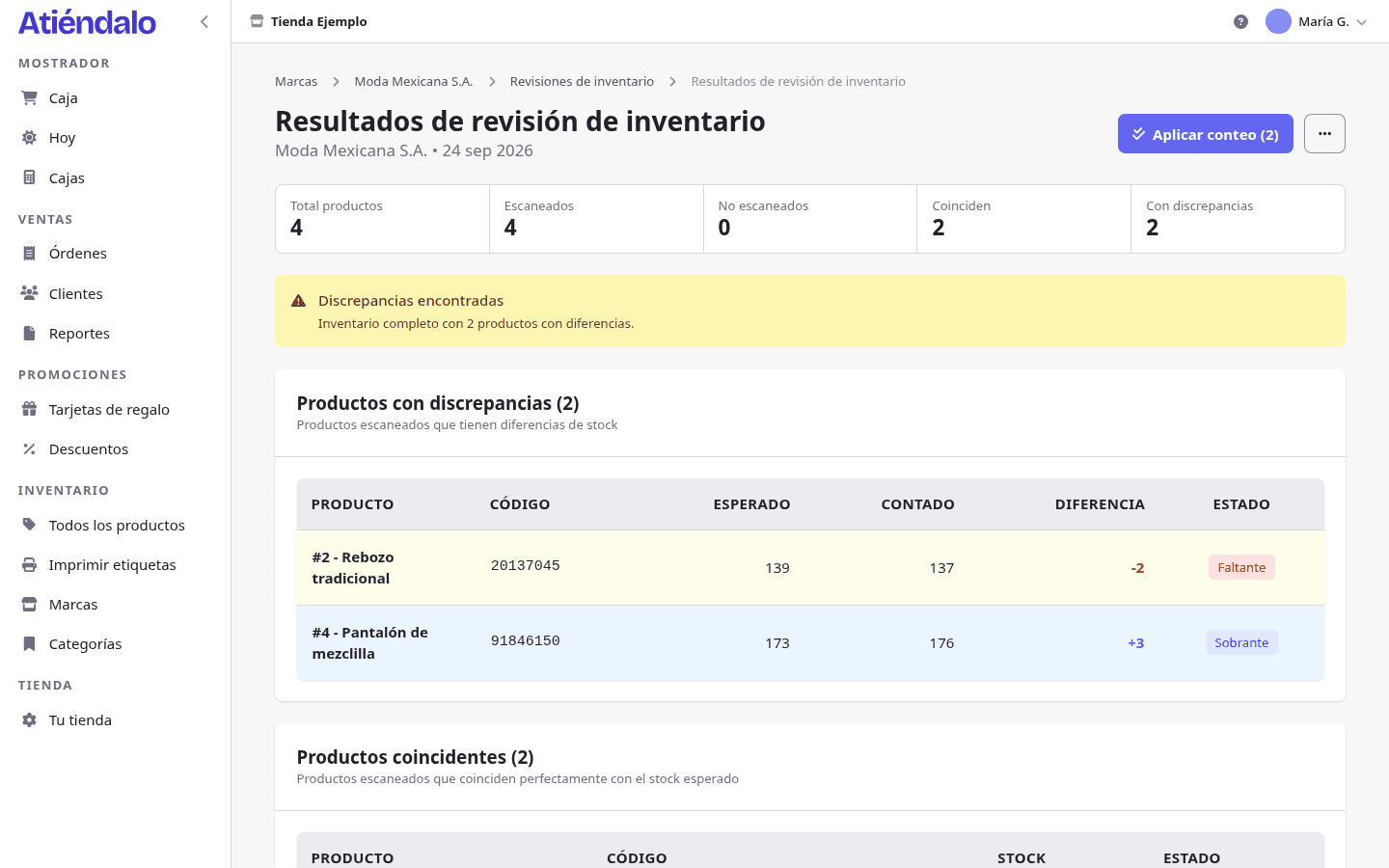
When you finish you’ll have three groups: products that match, products with a difference, and products you never found. Before adjusting anything, sort the differences out.
- Counting mistake. The most frequent cause. A box that wasn’t opened, a rack left unchecked, a piece scanned twice. Recount only those products before concluding anything.
- Unrecorded delivery. There is extra stock because the supplier dropped off pieces and nobody entered them. The fix is to record the delivery, not to invent a surplus.
- Unrecorded sale or lost item. Stock is missing with no explanation. It hurts the most, and with consignment you need an agreement with the consignor about who absorbs it.
- Misidentified product. One style is over and another is short by the same amount. Probably one was sold under the other’s code.
Products you didn’t scan don’t mean they don’t exist. If you only counted part of the space, don’t zero them out.
Adjust with a record, not by hand
Once the differences are explained, you correct the stock. What you shouldn’t do is edit the product’s number directly: a number that changed with no document behind it is one nobody will be able to explain three months from now.
The adjustment should be a movement with a date, a reason, who made it and the quantity per product, just like a delivery but marked as a count adjustment. That way, when a consignor asks why their stock went down, the history answers. And a count is applied once: applying it twice doubles the adjustment.
How often to count
There is no single right frequency for every shop. A practical rule of thumb:
- The consignors that sell most or carry the most valuable pieces, more often.
- Any consignor before settling a long period or before they leave.
- The whole shop at least once in a cycle you define, even if in parts.
- A consignor that just showed a big difference, in the next cycle, to see if it repeats.
Counting in Atiéndalo
In Atiéndalo a physical inventory is an inventory check per brand. Starting one freezes the brand’s active products with their expected stock, zero-stock ones included, and that snapshot is never re-synced. You count by scanning with a reader or the phone camera, or by typing the code; only exact matches on barcode, SID or name are accepted. Progress is saved on the server and can be picked up on another device. Counter staff can count; applying the count is for an admin, happens once, and creates an adjustment receipt with the reason Count adjustment only for scanned products with a difference.
The Consignment & settlements page explains how counting fits with consignors and their settlements. If you already use Atiéndalo, the step by step is in Physical inventory counts.

If you already use Atiéndalo
- Physical inventory counts — Audit each brand's real stock by scanning product by product.
- Stock receipts — Record the merchandise you receive from each brand and keep your inventory current.